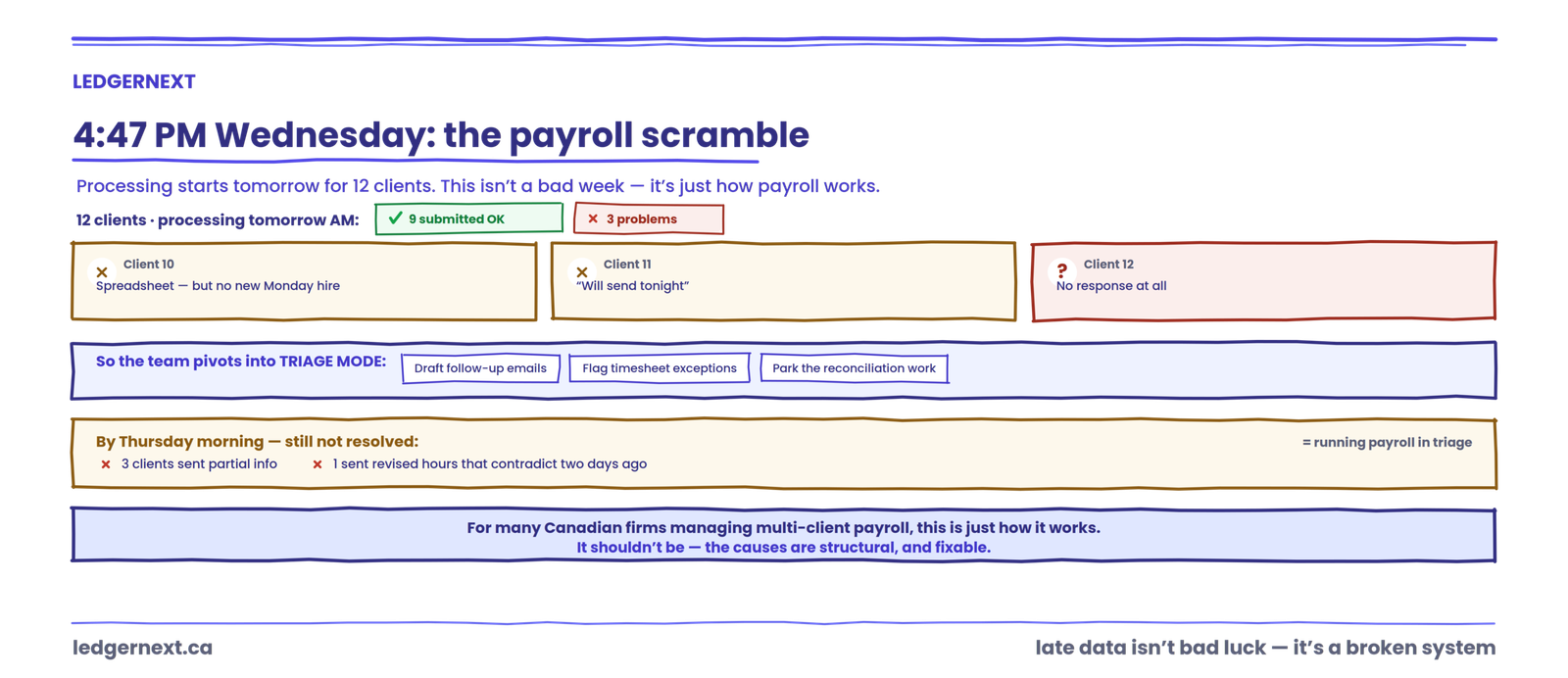
It’s 4:47 PM on Wednesday. Payroll processing starts tomorrow morning for twelve clients. Nine have submitted their information. One sent a spreadsheet with last week’s hours but nothing about the new warehouse hire who started Monday. Another replied to the reminder email with “will send tonight.” The twelfth hasn’t responded at all.
So the payroll team pivots. Someone starts drafting follow-up emails. Someone else flags the missing timesheet exceptions and parks the reconciliation work they’d planned for the afternoon. By Thursday morning, three clients have sent partial information, one has sent revised hours that contradict what they submitted two days ago, and the team is running payroll in triage mode.
This isn’t a bad week. For many Canadian accounting firms managing payroll across multiple clients, this is just how payroll works.
It shouldn’t be. By the end of this article, you’ll understand the structural reasons client payroll data arrives late, why the most common fix (more reminders) doesn’t solve the problem, and what a reliable submission system actually looks like in practice.
Who this is for (and who it isn’t)
This is written for Canadian accounting firms, CPA practices, bookkeeping firms, and outsourced payroll providers processing payroll for multiple clients. If you’re managing more than a handful of payroll clients and your team regularly spends time chasing missing hours, employee changes, or approvals, this applies directly.
If you’re an employee wondering why your paycheque was late, this isn’t the article. Your employer’s payroll provider or HR department is the right place to start.
Why payroll client data arrives late
Payroll data usually arrives late because the submission process itself is unclear, inconsistent, or too dependent on manual follow-up. Clients may not know exactly what information is required, where to send it, who needs to approve it, or what happens if they miss the cutoff.
That sounds simple. The causes underneath it aren’t.
Clients don’t know exactly what to submit
“Send us your payroll info” is a request most firms have made. It’s also vague enough to guarantee incomplete responses. A client might send hours but forget about the commission adjustment. They might mention a termination in a phone call but never confirm the ROE details in writing. They might assume “payroll info” means timesheets only, not new-hire paperwork, benefit changes, or pay rate updates.
When the employee master data is incomplete, the payroll register can’t be finalised. The firm fills the gap with follow-up emails, and the cycle starts.
The three dates clients confuse
There are three distinct dates in every payroll cycle, and most clients only know one of them.
1 · Pay date
When employees get paid. The only date most clients track.
2 · Processing date
When the firm actually runs payroll.
3 · Client submission deadline
The cutoff for complete information before processing begins.
Clients anchor on the pay date. They rarely think backwards from it. If pay date is Friday and the firm needs data by Tuesday to process on Wednesday, a client who sends information Thursday morning genuinely believes they’re “on time.” They aren’t, but nobody told them otherwise in terms they understood.
Information arrives through too many channels
One client emails a spreadsheet. Another texts the owner’s mobile. A third leaves a voicemail about a bonus. A fourth uploads to a shared drive but doesn’t mention it.
When the source-to-payroll workflow is scattered across email, calls, messaging apps, spreadsheets, and verbal requests, the firm has no single place to check what’s been received and what’s missing. That fragmentation is where timesheet exceptions hide, where duplicate requests happen, and where version-control problems start. If you’ve ever processed payroll using a spreadsheet that turned out to be an older version, you already know the cost.
This is one of the reasons email chains don’t scale for client collaboration in accounting firms.
Nobody owns final approval
Who at the client’s end is responsible for confirming the information is complete and accurate? In many engagements, that’s never explicitly defined. The office manager sends hours, the owner approves bonuses verbally, and the bookkeeper emails benefit changes separately. When something is missing, the firm doesn’t know who to ask because three people each assumed someone else handled it.
The firm keeps making exceptions
This is the one that compounds over time. A client misses the cutoff. The firm accommodates the late submission because it’s faster than pushing back. Next cycle, the client submits late again. Within a few months, the “deadline” is just a suggestion.
Every accommodation trains the client that the cutoff is flexible. And every late exception the firm absorbs without tracking it becomes invisible unpaid work, which is one of the primary drivers of payroll scope creep in Canadian accounting firms.
What late payroll information actually costs
The cost goes well beyond “payroll is a day late.” Late data triggers a chain reaction inside the firm.
| Problem | What actually happens inside the firm |
|---|---|
| Late submission | Staff interrupt planned work to chase information |
| Incomplete data | More follow-up, verification, and back-and-forth |
| Last-minute changes | The processing schedule gets rewritten on the fly |
| Rushed processing | Less time for variance analysis and GL tie-out |
| Repeated exceptions | Workload becomes unpredictable week to week |
| Untracked extra effort | Payroll profitability quietly declines |
One practitioner-facing source attributed 73% of missed payroll deadlines to late client data submission rather than internal processing errors. A separate analysis found 23% of misses came specifically from approval bottlenecks where a single client contact was unavailable. Those numbers are directional rather than definitive (they come from vendor and practitioner content, not large-scale independent research), but they match what most firms experience: the bottleneck is almost always upstream.
The Canada Revenue Agency sets remittance schedules based on the employer’s remitter type, and late remittances can trigger penalties. When client data arrives late enough to compress the processing window, the firm absorbs the compliance risk too.
Why reminders alone don’t solve the problem
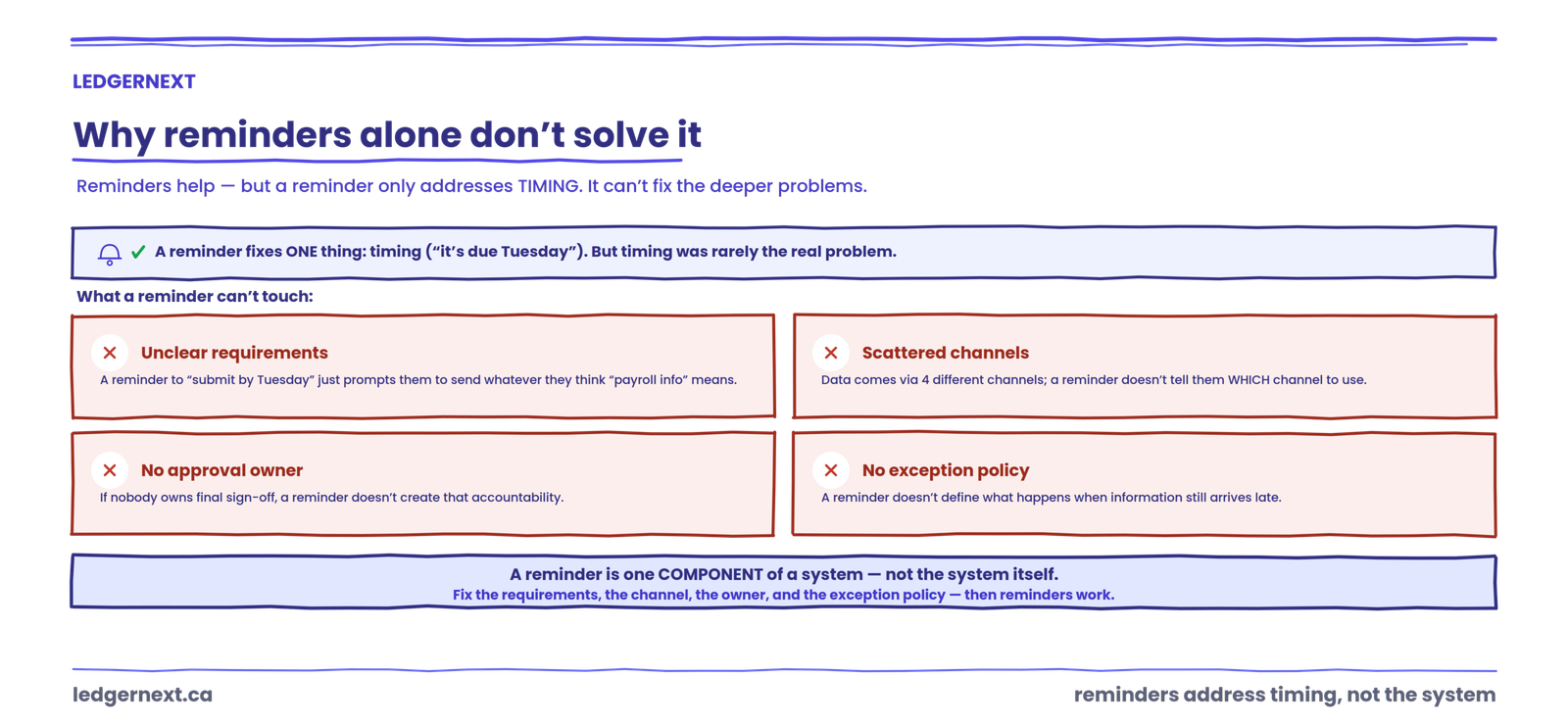
The instinct is to send more reminders. And reminders help. But a reminder only addresses timing. It doesn’t fix unclear requirements, scattered submission channels, missing approval ownership, or the absence of an exception policy.
Think of it this way. If a client doesn’t know exactly what to submit, a reminder to “submit your payroll information by Tuesday” just prompts them to send whatever they think payroll information means. If they’re sending data through four different channels, a reminder doesn’t tell them which channel to use. If nobody at the client’s end owns final sign-off, a reminder doesn’t create that accountability.
A reminder is one component of a system. It’s not the system itself.
The 5-part payroll submission system
This is a practical framework LedgerNext recommends for building a more predictable payroll submission workflow. It’s not an industry standard or regulation. It’s a structure that addresses the five failure points described above.
1. Define what clients must submit
Create a specific list for each client. Not “payroll information.” A defined set: employee hours, overtime, new hires (with start dates and pay rates), terminations (with last day worked and ROE reason), bonuses, commissions, pay rate changes, benefit or deduction changes. When the requirements are explicit, the client can actually check their own completeness before submitting.
2. Set a clear payroll cutoff
The cutoff should be expressed in terms the client understands, tied to their pay date and working backwards. “All payroll information must be submitted by 5 PM Tuesday for Friday pay” is clear. “Please submit promptly” is not. ADP Canada and Payworks both publish processing cutoff times for their platforms; your firm needs an equivalent internal cutoff that accounts for review, GL tie-out, and period-end accruals.
3. Centralise submissions
One channel. One place. If the firm accepts payroll data through a portal, then the portal is the only place. Not also email. Not also text. Not also a phone call to the partner. One channel eliminates the version-control problem, creates a visible audit trail, and makes it possible to see at a glance which clients have submitted and which haven’t.
4. Confirm and approve before processing
Before final processing, someone at the client’s end needs to confirm: this is everything, these numbers are correct, process it. That confirmation should be documented. Without it, the firm is processing payroll based on assumed completeness, and any error becomes a shared-blame situation with no clear trail.
5. Create an exception process
Late information will still arrive. The question is whether the firm handles it ad hoc every time or follows a defined process. For many firms, a practical starting point looks like this: information received after the cutoff either moves to the next payroll cycle, gets processed as an approved exception with the additional effort tracked, or triggers an off-cycle payroll where the situation requires it (final pay for a termination, for example). Your engagement terms and payroll workflow may differ, but having a written policy changes the conversation from “can you squeeze this in?” to “here’s how late changes are handled.”
If you’re building standardised workflows across your firm, the exception process is where most of the ambiguity lives. Define it once and it stops being a negotiation every cycle.
One place to see who’s submitted and what’s missing
LedgerNext centralises payroll submissions, surfaces missing information before the cutoff, and gives your team a single view of readiness across every client.
The ghost errors: problems forums discuss but guides skip
| Symptom | Root cause | The fix practitioners actually use |
|---|---|---|
| Payroll can’t be finalised on time | Client submitted hours or changes late | Hard cutoff with automated reminders at 72, 24, and 4 hours before deadline |
| GL doesn’t match payroll report | Off-cycle payroll posted in one system only | Check for bonus or final-pay runs before forcing an adjusting entry |
| Employee count changed unexpectedly | New hire or termination not updated in master data | Compare payroll register against active roster before every run |
| “Everything looks fine” but a small variance remains | Rounding differences or prior-period adjustments buried in the register | Aggregate tiny variances by period and tag them before posting |
These aren’t exotic problems. They’re the Tuesday afternoon problems that eat thirty minutes here, an hour there, across every payroll cycle.
Where practitioners disagree
There’s a live debate about whether firms should enforce hard cutoffs or maintain flexibility for client convenience. One side argues that a strict deadline with real consequences (late submissions move to the next cycle, full stop) is the only way to change client behaviour. The other side, often partners worried about client retention, argues that flexibility is part of the service and that rigid cutoffs create friction.
I land on the hard-cutoff side with a documented exception path. A flexible deadline isn’t a deadline. But a hard cutoff without a clear, fair process for genuine exceptions just creates resentment. The exception process is what makes the cutoff enforceable.
The difference between a deadline and a system
A deadline tells people when something should happen. A system makes it easier for that thing to happen consistently.
Most firms have deadlines. Fewer have systems. The payroll submission checklist below is a diagnostic: if your firm can check every box, you have a system. If you can’t, you have a deadline and a lot of manual recovery work.
How late data connects to scope creep
Late submissions create work that sits outside the predictable payroll process: additional client communication, emergency processing, corrections after the fact, schedule disruption for other clients. That work is real, but it’s often absorbed without being tracked or billed. Over time, it erodes payroll profitability without anyone making a conscious decision to discount the service. I
Making payroll deadlines easier to manage with connected workflows
The system described above works with any toolset. Spreadsheets, email templates, calendar reminders. But as client count grows, the manual version starts to strain. Tracking which of fifteen clients have submitted, what’s missing from each, who needs a second reminder, and which exceptions are pending becomes its own workload.
Frequently asked questions
Why do clients submit payroll information late?
Most late submissions trace back to unclear requirements, not client negligence. When clients don’t know exactly what information is needed, where to send it, and when it’s due, they default to sending what they think is right, when they get around to it. Scattered submission channels and missing approval ownership make the problem worse. A defined submission process with specific requirements and a firm cutoff addresses the root cause rather than the symptom.
What happens when payroll information is submitted after the deadline?
The firm should follow a predefined exception process. Depending on the situation and your engagement terms, the late change either moves to the next payroll cycle, gets processed as a tracked exception, or triggers an off-cycle run. The key is that the decision follows a policy rather than being improvised every time. CRA remittance deadlines don’t move because a client was late, so the compliance risk sits with whoever absorbs the delay.
How do you manage late timesheets?
Start by separating the timesheet problem from the reminder problem. Late timesheets usually mean the client doesn’t have a clear internal process for collecting and approving hours before your cutoff. A checklist sent to the client five days before the deadline, specifying exactly what’s needed, gives them time to gather information internally. Automated reminders at 72 and 24 hours before cutoff help, but only if the requirements are already clear.
What should a payroll submission checklist include?
Employee hours and overtime, new hires with start dates and pay details, terminations with last day worked, bonuses and commissions, pay rate changes, benefit or deduction updates, and explicit confirmation that the submission is complete. The checklist should match the client’s actual payroll complexity. A five-person client needs less than a client with sixty hourly employees across three provinces.
Should late payroll requests be treated as out-of-scope work?
That depends on your engagement letter and how frequently it happens. A single late submission handled as a courtesy is normal client service. Repeated late submissions that require emergency processing, extra communication, and schedule disruption are a different situation. Tracking the additional effort lets you have a data-backed conversation about whether the engagement terms need to change, rather than quietly absorbing the cost.
How can accounting firms reduce last-minute payroll changes?
Require client approval before a defined cutoff, and make the cutoff early enough that your team has review time before processing. Most last-minute changes happen because the client’s internal approval process runs right up against (or past) the firm’s processing window. Moving the client deadline earlier by even one business day creates a buffer that absorbs most of the volatility.
The next problem you’ll hit after fixing late submissions is figuring out what to do with the time you get back. That’s a good problem. Start with whichever part of the system above is weakest in your firm right now, define it clearly, and enforce it for one payroll cycle. The second cycle is easier.
When chasing clients becomes the bottleneck
A connected workflow platform can centralise submission tracking, surface missing information before the cutoff, and give your team a single view of payroll readiness across every client.